Wednesday, 10 April 2013

Retro Camera Featured App Review

R
etro Camera you'll take delicious old-school pics your friends will drool over. 5 cameras, 5 sets of vintage vignetting, film scratch, black and white & cross processing effects for that off-the-hip analog look. Inspired by the Lomo, Holga, Polaroid, Diana, the toy cameras and Hipstamatic. Instant Nostalgia now free.

The interface is pretty simple and gives you a shutter button, a menu button to select a different camera, a toggle for color photos or black and white photos, an info button about your currently selected camera, and a gallery button. The entire UI changes depending on which camera you’re currently using, but the buttons more or less stay the same and keep their functions. Overall, it’s a really well designed app that’s a ton of fun to use, especially if you want the camera app to apply effects to your photos instead of manually doing the work post-shot.
Retro Camera Retro Camera
Urbian
   star on dark img Retro Camerastar on dark img Retro Camerastar on dark img Retro Camerastar on dark img Retro Camerastar half dark img Retro Camera

Monday, 8 April 2013

Memory Booster - RAM Optimizer

M
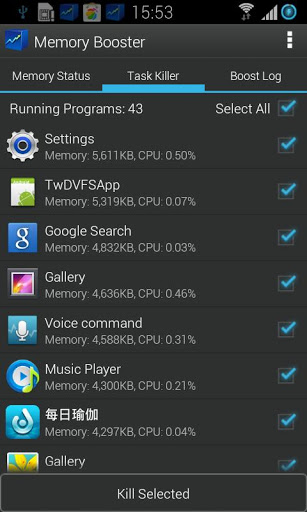
emory Booster is a powerful mobile memory & RAM boosting tool specially designed for Android smartphone and tablet users. It is designed to tackle the difficult yet crucial problem of memory management for all Android devices. Memory Booster reclaims lost memory for your programs by defragmenting your smartphone's memory and recovering memory leaks from poorly behaved applications.

Features:

  • Memory Booster provides a live chart to demonstrate your device's total/free memory and current memory usage.
  • Besides automatic memory boosting, Memory Booster also allows you to manually boost your memory by Quick Boost.
  • With Auto Boost Threshold set, Memory Booster keeps your memory higher than desired level, and act immediately if memory drops down.
  • With Auto Boost Interval, Memory Booster runs in the background and automatically reclaims memory for your Android at interval.
  • Memory Booster always watches your system resources and cleans up system memory once it reaches a critical point.

Memory Booster Memory Booster
IMOBLIFE INC.
   star on dark img Memory Boosterstar on dark img Memory Boosterstar on dark img Memory Boosterstar on dark img Memory Boosterstar on dark img Memory Booster


AirDroid - Featured App Review

A
irDroid is a fast ,free app that lets you wirelessly manage&control your Android Device from a web browser Over-The-Air. Transfer files to and from your device via web browser. Wireless operation via WiFi connection.


Features

  • Receive, send, forward or delete SMS messages.
  • Install, uninstall, backup, search apps and do batch processing.
  • Preview, delete, upload, download, set as wallpaper and photos slide show from desktop.
  • Share clipboard text between desktop and device.
  • Group, search, create contacts, check and delete call logs.
  • Search, preview, upload, download, delete and customize ringtones for phone calls, notifications and alarms.
  • Play, search, upload, download, delete, or set as phone call, notification and alarm ringtones.
  • Stay safe even on a public Wi-Fi network.
  • View your Android's screen, take a screenshot, or even record a screencast.
  • AirDroid is designed for multitasking. Move apps between desktops to better organize your work.


AirDroid AirDroid
SAND STUDIO
   star on dark img AirDroidstar on dark img AirDroidstar on dark img AirDroidstar on dark img AirDroidstar on dark img AirDroid

Tuesday, 26 March 2013

SketchBook Pro - Featured Android App Review

A
utodesk SketchBook® Pro for Tablets is a professional-grade paint and drawing application designed for Android tablets with screen sizes of 7" and above. With the same paint engine as the renowned SketchBook Pro softwares, SketchBook Pro for Tablets delivers a complete sophisticated set of sketching & painting tools through a streamlined and intuitive user interface.


Features:

  • Full Screen work space with support for any device orientation
  • Create large canvases (up to 6.6 MP on newer models)
  • Dynamically sets available layers
  • Pressure sensitivity
  • Ability to draw with only the pen
  • The canvas will not recognize touch input
  • Touch input will be recognized by all the Tools, Panels, and menus.
  • Two finger pan & zoom navigation with 2500% zoom
  • Professional grade paint engine delivers smooth and precise brush strokes
  • More than 60 preset brushes, including pencils, pens, markers and natural media
  • 90 additional brushes and stamps brushes
  • Completely customizable brush settings for each brush
  • Draw styles for creating straight lines, rectangles, and circles
  • Straight edge and circle guides
  • Synthetic pressure sensitivity (brush fade-off)
  • Dynamic symmetric drawing
  • Import images from Photo Library
  • Import from Camera
  • Duplicate, Merge and Reorder Layers
  • Move, scale, and rotate layers interactively using Multi-Touch
  • Toggle visibility and adjust Layer Opacity
  • Layer Blend Modes: Multiply, Add, Screen and Normal
  • Preserve Transparency mode to paint only where paint already exists
  • Reorder layers
  • Store and view work-in-progress
  • Export images to your local storage
  • Import/Export as a layered file (PSD)
  • Share via Intent
  • Color Wheel with HSB and RBG color space
  • Customizable Color Swatches
  • Copic Color Library
  • Customizable double tap canvas shortcuts.
  • Palettes to store your favorite brushes and colors
  • Radial menu so store custom brush and color combinations.
  • Built in SketchBook.com news panel for live info about Sketching events and announcements
SketchBook Pro SketchBook Pro
Autodesk Inc.
   star on dark img SketchBook Prostar on dark img SketchBook Prostar on dark img SketchBook Prostar on dark img SketchBook Pro


TED - Featured Android App Review

T
ED's official Android app presents talks from some of the world's most fascinating people: education radicals, tech geniuses, medical mavericks, business gurus, and music legends. Find more than 1400 TEDTalk videos and audios (with more added each week) on the official TED app -- now for tablets and smartphones. This app is made possible with the generous support of Sony.
TED Android app!

TED TED
TED Conferences
   star on dark img TEDstar on dark img TEDstar on dark img TEDstar on dark img TEDstar on dark img TED

Recent Posts

Unordered List

Text Widget

Blog Archive